

kanory
-
Posts
2384 -
تاريخ الانضمام
-
تاريخ اخر زياره
-
Days Won
140
نوع المحتوي
التقويم
المنتدى
مكتبة الموقع
معرض الصور
المدونات
الوسائط المتعددة
كل منشورات العضو kanory
-
اخي الكريم ليس لدي حل والسبب ارقام id ترقيم تلقائي وهناك جداول عديدة مرتبطة بها ... اعتذر لك في عدم حل مشكلتك ... ربما تجد حلا من قبل بعض الاعضاء ...
-
اخي محمد هل هناك جداول أخرى مرتبطة برقم id غير الجدولين الموجودين في المثال وهل لو تم تغيير الرقم تتأثر بذلك بيانات أخرى في جداول أخرى ام لا .... لان الربط بحقل ترقيم تلقائي هذه واحدة من مشاكله .
-

قيم فريدة ---- تكرار الاسماء في كومبو بوكس البحث
kanory replied to عبد اللطيف سلوم's topic in قسم الأكسيس Access
هل جربت التجميع -
التعديل الاخير لكود الاقتطاع لم يلبي الرغبات 100%
kanory replied to Taher DZ's topic in قسم الأكسيس Access
طيب حبه حبه الان كريمو٦٧ أليس دافع للانخراط من خلال الصورة الأولى ... لاحظ الصورة الاولى -
التعديل الاخير لكود الاقتطاع لم يلبي الرغبات 100%
kanory replied to Taher DZ's topic in قسم الأكسيس Access
انظر لهذا العامل تم دفع الانخراط .... وانت طالب في موضوع سابق ان يتم تجاوز العامل الذي دفع 3000 لذلك تم تجاوزهم من دفع الانخراط

-
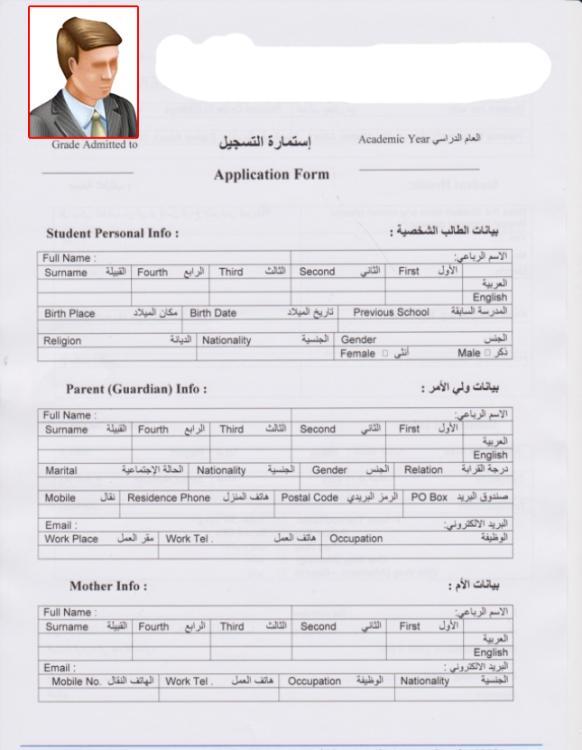
ممكن توضيح اكثر يعني هل تريد اقتصاص الصورة من البطاقة نفسها وهل ممكن مثال

-
هل يمكن رصد التغيرات الحادثة على جدول مباشرة
kanory replied to ابوخليل's topic in قسم الأكسيس Access
كلنا ذاك الرجل ..... امين .... -
هل يمكن رصد التغيرات الحادثة على جدول مباشرة
kanory replied to ابوخليل's topic in قسم الأكسيس Access
وعليكم السلام ورحمة الله وبركاته اخي @ابوخليل انظر هذا الموضوع قد يفيدك -
جرب هذا الكود .............. Sub UpdateRecords() Dim db As DAO.Database Dim strSQL As String ' تعيين قاعدة البيانات الحالية Set db = CurrentDb ' تحديث حقل ITEM_PRES_DK (إزالة 0. والاحتفاظ فقط بالرقم بعد العلامة العشرية) strSQL = "UPDATE TAEBOL_TEST SET ITEM_PRES_FK = ITEM_PRES_FK * 10 WHERE ITEM_PRES_FK < 1;" db.Execute strSQL, dbFailOnError ' تحديث حقل النسبة (إضافة % إلى الرقم) strSQL = "UPDATE TAEBOL_TEST SET NASBA_2 = NASBA_2 & '%';" db.Execute strSQL, dbFailOnError ' تحرير الذاكرة Set db = Nothing MsgBox "تم تحديث السجلات بنجاح!", vbInformation End Sub
-
تغيير الشق الايمن من محتوى الحقل باجراء سريع
kanory replied to Abdelaziz Osman's topic in قسم الأكسيس Access
وعليكم السلام ورحمة الله جرب الكود التالي Sub UpdateSerialNumbers() Dim db As DAO.Database Dim sql As String Dim currentYear As String ' الحصول على السنة الحالية من نظام الكمبيوتر currentYear = Year(Date) ' إنشاء استعلام التحديث sql = "UPDATE [أرقام مسلسلة] " & _ "SET مسلسل = Left(مسلسل, InStr(مسلسل, '/') - 1) & '/" & currentYear & "'" ' فتح قاعدة البيانات وتنفيذ الاستعلام Set db = CurrentDb db.Execute sql, dbFailOnError ' تنظيف الذاكرة Set db = Nothing ' إظهار رسالة تأكيد MsgBox "تم تحديث أرقام المسلسل إلى سنة " & currentYear, vbInformation, "تحديث ناجح" End Sub شرح الكود: يحصل على السنة الحالية من النظام. ينشئ استعلام تحديث يستبدل الجزء الأيمن (/2024) بالسنة الجديدة. يستخدم دالة Left() لاستخراج الجزء الأيسر من السلسلة النصية قبل العلامة /، ثم يضيف /السنة الجديدة. ينفذ التحديث عبر db.Execute. يعرض رسالة تأكيد بعد انتهاء العملية. طريقة الاستخدام: يمكنك تشغيل هذا الكود من خلال زر في نموذج، بإضافة زر وتنفيذ الإجراء عند النقر عليه. أو تشغيله يدويًا من نافذة VBA. طريقة استخدام الكود انشئ زر وضع فيه Call UpdateSerialNumbers -
كود ايقاف عمل النموذج بعد عدد معين من الادخالات
kanory replied to عبد اللطيف سلوم's topic in قسم الأكسيس Access
كفكرة اجعل عملية التفعيل عند طريق الانترنت ومحددة الفترة الزمنية ويتوقف البرنامج خلالها ويجب على العميل طلب التفعيل لفترة اخرى او مدى الحياة -
لو استخدمت البحث في المنتدى تجد ما يسرك وهذا أحد الموضوعات
-
بعد نسخ الشيفرة ولصقها في النموذج لديك استدعي كود الفتح بهذه الصورة Private Sub Compact_Click() Dim path As String path = "E:\Auto\ddbee$" ' مسار قاعدة البيانات call CompactAndRepairDatabase Shell "MSACCESS.EXE " & path, vbNormalFocus End Sub
-
اولا هل تقوم بإجراء نسخ احتياطية لبياناتك قبل الضغط والإصلاح لان لاي سبب حصل خطأ قد تفقد بياناتك ... على كل حال هذه الشيفرة تقوم باللازم اقصد الضغط والإصلاح Sub CompactAndRepairDatabase() Dim dbPath As String Dim tempDbPath As String ' المسار الكامل لقاعدة البيانات الأصلية dbPath = "E:\Auto\dbbee.accdb" ' إنشاء مسار مؤقت لقاعدة البيانات بعد الإصلاح tempDbPath = "E:\Auto\dbbee_temp.accdb" ' تأكد من أن قاعدة البيانات الأصلية موجودة If Dir(dbPath) <> "" Then ' إجراء عملية Compact and Repair On Error Resume Next Application.CompactRepair SourceFile:=dbPath, DestinationFile:=tempDbPath, LogFile:=False If Err.Number = 0 Then ' استبدال قاعدة البيانات الأصلية بالنسخة الجديدة Kill dbPath ' حذف قاعدة البيانات الأصلية Name tempDbPath As dbPath ' إعادة تسمية النسخة المؤقتة إلى الأصلية MsgBox "تم إصلاح قاعدة البيانات بنجاح!", vbInformation Else MsgBox "حدث خطأ أثناء الإصلاح: " & Err.Description, vbCritical End If On Error GoTo 0 Else MsgBox "قاعدة البيانات غير موجودة في المسار المحدد!", vbExclamation End If End Sub
-
دالة DoCmd.OpenDataAccessPage تُستخدم لفتح صفحات الوصول إلى البيانات (Data Access Pages) وليس لفتح قاعدة بيانات خارجية. لفتح قاعدة بيانات أخرى، يمكنك استخدام دالة Application.OpenCurrentDatabase أو دالة Shell Application.OpenCurrentDatabase "E:\Auto\dbbee.accdb" إذا كنت تريد تشغيل قاعدة البيانات كملف منفصل باستخدام Shell Dim path As String path = "E:\Auto\dbbee.accdb" ' مسار قاعدة البيانات Shell "MSACCESS.EXE " & path, vbNormalFocus
-
امكانية دمج نوعين من اكواد الصور ليصبح كود واحد
kanory replied to محمد التميمي's topic in قسم الأكسيس Access
دائما ابحث عن حل كامل لمشاكل برامجك .... لا ترضي بانصاف الحلول ..... لو عرضت لنا تلك المسميات لربما تجد الحل من احد اعضاء المنتدى فيصبح لديك حل 100 % تفضل انظر الجدول .. ليس فيه مسارات .... وانظر الى مجلد الصور فيه الصور باسماء ارقام تلك السجلات فقط ... ولكن تحتاج الى تعديل زر الاضافة والحذف لم يسمح وقتي بذلك التعديل 555.rar -
امكانية دمج نوعين من اكواد الصور ليصبح كود واحد
kanory replied to محمد التميمي's topic in قسم الأكسيس Access
ممكن الاستغناء عن إضافة المسارات في الجدول ويتم عرضها من المجلد مباشرة بمعرفة الرقم فقط -
امكانية دمج نوعين من اكواد الصور ليصبح كود واحد
kanory replied to محمد التميمي's topic in قسم الأكسيس Access
اصنع زر في النموذج لديك ثم ادرج هذا الكود فيه ............... Dim db As DAO.Database Dim rs As DAO.Recordset Dim oldPicPath As String Dim newPicPath As String Dim FirstName As String Dim keyVal As String Dim desktopPath As String Dim sourceFolder As String Dim destFolder As String Dim fileSystem As Object desktopPath = CreateObject("WScript.Shell").SpecialFolders("Desktop") sourceFolder = desktopPath & "\555\Pic1\" ' المجلد المصدر destFolder = desktopPath & "\555\Pictures\" ' المجلد الوجهة Set fileSystem = CreateObject("Scripting.FileSystemObject") If Not fileSystem.FolderExists(destFolder) Then fileSystem.CreateFolder destFolder End If Set db = CurrentDb Set rs = db.OpenRecordset("Table1", dbOpenDynaset) Do While Not rs.EOF If IsNull(rs!Pic2) Or rs!Pic2 = "" Then FirstName = rs!FirstName keyVal = rs!Key If Not IsNull(FirstName) And Not IsNull(keyVal) Then oldPicPath = sourceFolder & FirstName & ".jpg" newPicPath = destFolder & keyVal & ".jpg" If fileSystem.FileExists(oldPicPath) Then fileSystem.MoveFile oldPicPath, newPicPath rs.Edit rs!Pic2 = newPicPath rs.Update End If End If End If rs.MoveNext Loop rs.Close Set rs = Nothing Set db = Nothing Set fileSystem = Nothing MsgBox "تم نقل الصور وتحديث الحقل Pic2 بنجاح", vbInformation -
اضافة عنصر جديد بمربع التحرير والسرد عند التسجيل
kanory replied to محمود _ المصري's topic in قسم الأكسيس Access
وعليكم السلام ورحمة الله وبركاته لاحظ الشرح ثم استخدم هذا ................ Private Sub NEM_SH_NotInList(NewData As String, Response As Integer) Dim db As DAO.Database Dim rs As DAO.Recordset Dim MsgBoxResult As VbMsgBoxResult MsgBoxResult = MsgBox("العنصر '" & NewData & "' غير موجود. هل ترغب في إضافته؟", vbYesNo + vbQuestion, "إضافة عنصر جديد") If MsgBoxResult = vbYes Then Set db = CurrentDb Set rs = db.OpenRecordset("SH", dbOpenDynaset) NewID = Nz(DMax("ID_SH", "SH"), 0) + 1 rs.AddNew rs!ID_SH = NewID rs!ASASE = NewData rs.Update rs.Close Set rs = Nothing Set rs1 = Nothing Set db = Nothing Response = acDataErrAdded Else Response = acDataErrContinue End If End Sub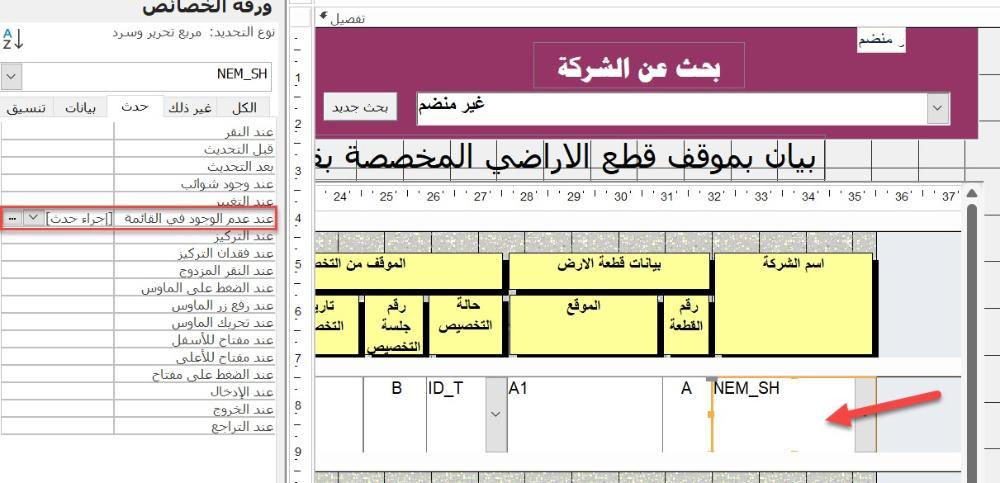
-
كود طباعة تقرير مصصم على ورقة حجم A3 في ورقة حجم A4
kanory replied to moho58's topic in قسم الأكسيس Access
مشاركة مع الاخوة .... هل الكود السابق الذي لديك تصدر التقرير ويطبع في نفس الوقت .... ام انت تطبع يدويا ... استخدم طريقة التصدير ثم الطباعة عن طريق الكود مباشرة دون تدخل منك -
طيب جرب التعديل الجديد ربما يعجبك ............. 1 (11).accdb
-
تفضل اضغط دبل كليك على الحقل وعلمنا ..... 1 (11).accdb
-
-
بارك الله فيك @MO87
-
جرب هذا Dim searchText As String Dim fieldValue As String ' النص الذي تبحث عنه searchText = "Ca" ' أدخل الكلمة أو جزء الكلمة المراد البحث عنها fieldValue = Nz(Me!Field1, "") ' جلب القيمة من الحقل Field1 مع التعامل مع القيم الفارغة ' التحقق إذا كانت القيمة تحتوي على النص المطلوب If InStr(1, fieldValue, searchText, vbTextCompare) > 0 Then ' فتح النموذج Form1 إذا تحقق الشرط DoCmd.OpenForm "Form1" Else ' عرض رسالة توضيحية إذا لم يتحقق الشرط MsgBox "الحقل لا يحتوي على النص المطلوب.", vbInformation, "تحذير" End If